Write it or say it. Postwright does everything after.
Postwright is a Mac app that takes the thing you made – a blog post, a recording of you talking, or a quick video from your phone – and turns it into finished posts on your blog, your newsletter, YouTube, and social media, then publishes them for you.
One-time purchase · no subscription · 14-day refund · Mac with an M1 chip or newer
Making the work is the fun part. Getting it seen is a second job.
You finish a post, and then the real chores start: publish it, send it to your email list, and write a version for every social network that points people back to it. You record a video, and then it needs editing, captions, a title, and a description, and the short clips people actually watch on their phones have to be found and cut by hand. Every one of those steps lives in a different tool, and most weeks some of them just don’t happen.
I built Postwright to do those chores for Step Zero, my own newsletter, and it did them there for a good while before anyone could buy it. You keep the part you’re good at: writing, or talking. Postwright does the rest and publishes it, and you can check anything before it goes out.

Three things it does. Use one, or all three.
Long-form video and phone video are free, in a tier called Studio. Publishing your writing is what Pro adds. Shorts and Reels, if you haven’t made one, are the vertical videos of a minute or two that YouTube and Instagram show to people who don’t follow you yet.
You write a post. Your blog, your list, and your followers all see it.
The writing is done, but nobody reads a post that only sits on your blog. Emailing it to your list and writing a separate post for each social network is the chore that gets skipped.
What you do
Write in a simple writing app such as iA Writer or Obsidian and save the file to your Postwright folder. (Those apps save plain text files, which is what Postwright reads. Google Docs doesn’t.)
What Postwright does
- Publishes the post to your website – WordPress, Ghost, Beehiiv, or a site you keep on GitHub – with your own header image or one it makes for you.
- Waits until the page is actually up, then emails it to your newsletter subscribers, so nobody ever gets a broken link.
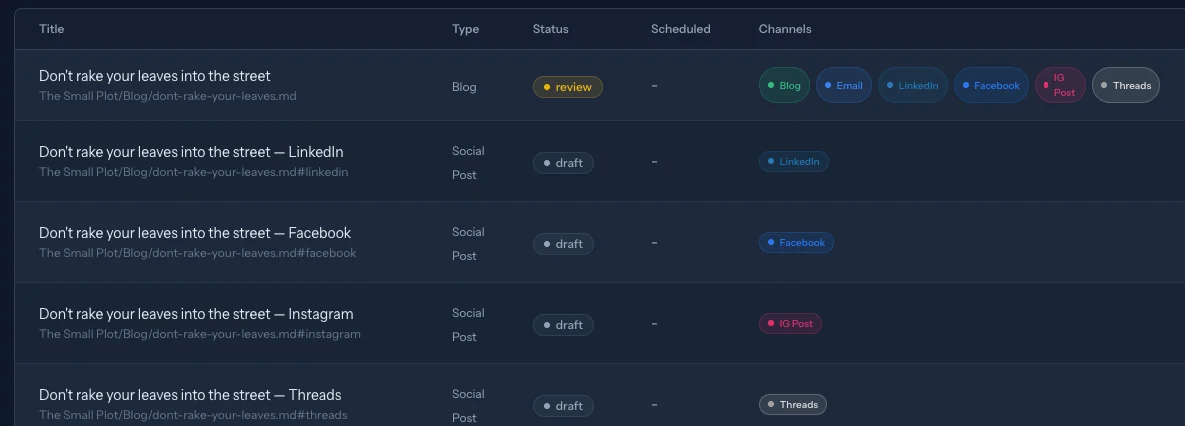
- Writes a post for LinkedIn, Facebook, Instagram, Threads, Bluesky, Mastodon, X, and Pinterest, each one sized for that network, linking back to your post, and with an image made for it. You describe your audience and how you write during setup, and you can edit any draft.
- Schedules those posts for the times your own followers have engaged most, and collects their comments in one inbox for you to answer.
What you get
Every post you write reaches your subscribers and your followers, without the copying, pasting, and rewriting.
You talk to a camera. You get an edited video and a week of Shorts.
Recording yourself takes twenty minutes. Editing out the ums, false starts, and long pauses takes hours, and finding the moments worth turning into short clips takes more. That’s why most recordings never get posted.
What you do
Record yourself talking, mistakes and all, and drop the file in a folder.
What Postwright does
- Edits it for you: cuts the ums, the false starts, the do-overs, and the dead air, keeps your last good take of each line, and evens out the sound.
- Shows you a preview of every cut, numbered, so if it trimmed something you wanted, you put it back by its number.
- Finds the moments that make sense on their own – at least three per video – and turns them into captioned Shorts, dropping any clip that never gets to its point.
- Writes the titles and descriptions, and once you approve, posts the full video to YouTube and spreads the Shorts across the open slots in your week on YouTube, Instagram, Facebook, and LinkedIn.
What you get
Talking is the only part you do. One recording becomes a finished video and a handful of Shorts that put you in front of new people all week.
You shoot a quick video on your phone. It posts itself, captioned.
A short phone video is the easiest way to show up, until you have to caption it and write a different post for three apps. Two minutes of filming turns into an hour of fiddling.
What you do
Film it on your phone and save it to a folder that syncs to your Mac, like Google Drive, Dropbox, or iCloud.
What Postwright does
- Transcribes what you said and burns the captions into the video.
- Writes the YouTube, Instagram, and LinkedIn posts to go with it.
- Asks you to approve it, in the app or from your phone through the Telegram messaging app, then posts it as a YouTube Short, an Instagram Reel, and a LinkedIn video.
What you get
Film it, approve it from your phone, and it’s out.
If you write, video is how new readers find you
The easiest place to start is this week’s essay: record yourself talking it through for ten minutes. The full video and its Shorts reach people on YouTube and Instagram who would never have opened your newsletter. With Pro, Postwright ties them back to the writing: each video’s description ends with a link to the essay, the full video can be embedded in the post, and your newsletter shows a clickable preview of it.
What you’ll need
No coding. A guided setup walks you through each step and checks what your Mac is missing, and if you get stuck, email me and I’ll help.
- A Mac with Apple’s own chip. M1 or newer, on macOS 14 or later. Apple menu → About This Mac tells you which chip you have. It needs to be on and awake when posts go out, so a laptop that spends the day closed in a bag will miss them.
- An AI account. If you pay for Claude and use Claude Code, Postwright runs on that at no extra cost. Otherwise, a pay-as-you-go account with Anthropic, OpenAI, or Google, with a daily spending limit you set.
- Your accounts, plus a one-time setup with Google and Meta. Your YouTube, Instagram, Facebook, and LinkedIn accounts. Because Postwright posts from your Mac instead of a company server, Google (for YouTube) and Meta (for Instagram and Facebook) ask you to set up your own access once. The setup and docs walk you through it.
- For your writing (Pro): a website and a way to send email. A site on WordPress, Ghost, or Beehiiv, or one you keep on GitHub, and a newsletter on Kit, Mailchimp, Ghost, or Beehiiv, or a sending service such as Resend. Substack doesn’t let outside apps post, so for Substack Postwright drafts your Notes for you to paste in.
One calendar, so nothing goes out broken
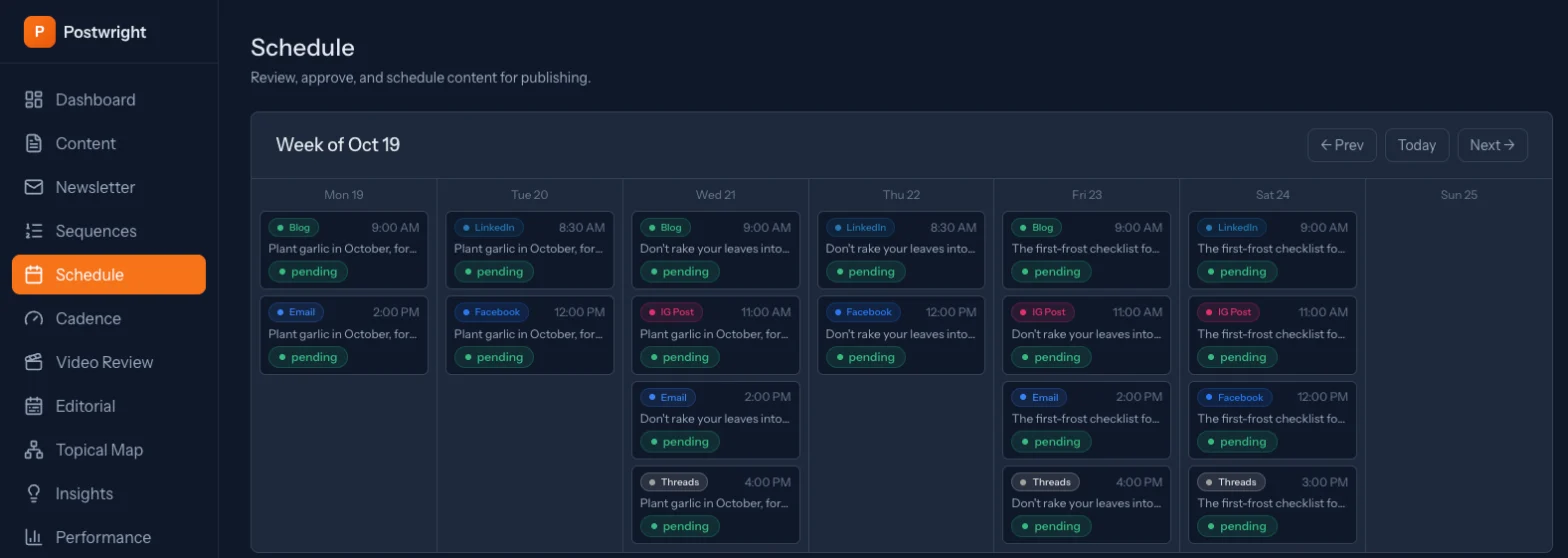
Most tools post whatever you schedule, whenever you scheduled it. Postwright knows how your pieces depend on each other: the newsletter can’t go out until the blog post it links to is live, and a social post can’t point to a page that isn’t there yet. So it publishes in that order, every time.
That saved me once already. My website quietly failed to update, and Postwright refused to email my subscribers links to pages that didn’t exist. If you pull a post back, the social posts waiting on it are cancelled too, and if something does fail, you see it on the dashboard instead of finding out from a reader.
How it compares
Postiz and Buffer are two popular tools for scheduling social media posts, and they reach more networks than Postwright does. Postwright does more of the work around the post: the blog, the newsletter, and the video.
| Postwright | Postiz | Buffer | |
|---|---|---|---|
| Price | Video tools free; Pro $199 once | $29–$99 a month | Free for 3 channels, then $6 per channel a month |
| Publishes your blog posts | Yes | To WordPress, Medium, Dev.to, and Hashnode | No |
| Sends your newsletter | Yes, with automated email sequences | Through Listmonk only | No |
| Edits your raw video | Yes | Not that I found | No |
| Cuts Shorts for you | From any video on your Mac | From a YouTube video, metered by the minute | No – posts clips you’ve already made |
| Waits for your post to go live before linking to it | Yes | Not that I found | Not that I found |
| Social networks | 8, plus YouTube, Telegram, Discord, and Slack | 30+ | 12 |
| Where it runs | Your Mac | Their cloud, or your own server | Their servers, in a browser or app |
Checked against each company’s own site in October 2026. Full, sourced comparisons, including Markette, a newer open-source tool: vs Postiz · vs Buffer · vs Markette
Pay once, and your work stays yours
Postwright runs on your Mac, not on my servers. Your videos and your subscriber list stay on your computer, and there’s no monthly bill from me that grows as your list does. The AI that drafts and edits runs on your own account: if you already pay for Claude and use Claude Code, Postwright can use that subscription at no extra cost, and if you use another AI company instead, you pay them for what you use and can set a daily spending limit.
The trade-off is that your Mac has to be awake for a post to go out on time. Postwright keeps it awake when a post is due, catches up within seconds if it fell asleep anyway, and can wake it a couple of minutes early if you turn that on.
The license is yours for good. If I stopped working on Postwright tomorrow, your copy would keep running.
Start free with video. Add your writing when you’re ready.
Studio
Freewith my newsletter
- Your raw recordings, edited for you
- Shorts found, cut, and captioned
- Phone videos captioned and posted
- Posts to YouTube, Instagram, Facebook & LinkedIn
- Free updates
Pro
Recommended$199once
- Everything in Studio
- Your blog posts published, emailed, and shared
- Social posts for eight networks, written for you
- Everything on one calendar, in the right order
- Free updates + email and Discord support
Team
$499once
- Everything in Pro
- For agencies and client work
- Up to 25 people on one license
- Clients approve posts before they go out
Your license key arrives by email right after checkout, with the download link. Support is me, by email or Discord, and if Postwright doesn’t work for your setup within 14 days, we’ll fix it together or I’ll refund you.
Secure checkout by Stripe · instant license delivery · 14-day refund · prices exclude any applicable tax · sold to US customers only · license terms
Questions you’d probably ask
What it does
I’ve never made a video. Can I start here?+
Yes. That’s who the free video tools are for. Record yourself talking about something you’d write about anyway, on your phone or a webcam, and Postwright handles the editing, the captions, the Shorts, and the posting. You check each piece before it goes out.
I only want to make videos. Do I need Pro?+
No. If you don’t have a blog or newsletter, the free Studio tier is the whole product for you: long-form editing, Shorts, and phone videos, posted to YouTube, Instagram, Facebook, and LinkedIn. Pro only matters once you have writing to publish.
Does it make YouTube thumbnails?+
No. YouTube picks a frame from the video unless you upload your own thumbnail in YouTube Studio.
I don’t make videos. Is Postwright still for me?+
Yes. Publishing your writing – the blog, the newsletter, and the social posts – doesn’t depend on video at all. That’s what Pro is.
Does it post anything without asking me?+
Not unless you tell it to. Videos and Shorts always wait for your approval, in the app or from your phone. For your writing, you can approve each piece yourself, or, once you trust it, let your regular schedule run on its own.
Will the social posts sound like me?+
During setup you describe your audience and how you write, and every draft is written from that. You can read and edit any post before it goes out, and if there are words or phrases you never want used, you can list them and it will steer around them.
I write in Ghost (or Google Docs). What changes?+
You’d write in a plain-text editor such as iA Writer instead of in Ghost’s or Google’s editor, because Postwright reads plain text files. If your site and newsletter live on Ghost, they can stay there: Postwright publishes the post to Ghost and can send it to your Ghost members, then writes the social posts. Ghost’s cheapest hosted plan doesn’t allow outside apps to publish, so check your Ghost plan first.
Which platforms does it publish to?+
Your blog (WordPress, Ghost, Beehiiv, or a site you keep on GitHub), your newsletter (through Kit, Mailchimp, Ghost, or Beehiiv, to the list you already have there, or from your own email address through a sending service such as Resend), YouTube, LinkedIn, Facebook Pages, Instagram, Threads, Bluesky, Mastodon, X, and Pinterest, plus announcements in Telegram, Discord, and Slack. It doesn’t post to TikTok or Reddit, and Substack has no way for apps to post, so Postwright writes your Substack Notes for you to paste in.
Setup and requirements
How hard is the setup?+
No coding, but it takes some patience. A guided setup walks you through each step, and a system check tells you what your Mac is missing and how to fix it. Along the way you’ll copy a few access codes from your AI company and the platforms you post to. The docs walk through every step, and if you get stuck, email me and I’ll help. If you bought Pro or Team and it still doesn’t work within 14 days, you get your money back.
What happens if my Mac is asleep when a post is due?+
Postwright keeps an awake Mac from sleeping when a post is due within 15 minutes, and if it slept anyway, whatever came due goes out within seconds of waking, still in order. An optional helper can wake a sleeping Mac a couple of minutes before a post, as long as the lid is open or an external display is attached.
Pricing and licenses
What’s the catch with the free Studio tier?+
You join my Step Zero newsletter to get it. That’s it: long-form video and phone video are free to keep using, and you can unsubscribe any time. Publishing your writing is Pro.
What does the Team license cover?+
Agency and client work for up to 25 people in one organization, each running their own copy with one shared license key. It also lets a client approve a post before it goes out.
What if it doesn’t work for my setup?+
Reach out within 14 days. Either we’ll fix it together or I’ll refund you.
Keep making the work. Let Postwright get it seen.
The video tools are free. Pro adds your writing, for $199 once, with 14 days to make sure it works for you.