// compare
Postwright vs Buffer
Buffer is a web-based social media scheduler, around since 2010, priced per channel with a free plan for three channels. Postwright is a Mac app you buy once that publishes your blog, your newsletter, your social posts, and your video, in the order those channels depend on each other.
If you need social scheduling on a few channels, from your phone or any browser, Buffer is cheaper to start and easier to pick up. If your publishing starts with a blog post and a newsletter, Buffer doesn’t publish either one, and that’s the part Postwright is built around.
Side by side
| Buffer | Postwright | |
|---|---|---|
| Price | Free: 3 channels, 10 scheduled posts each. Essentials: $6 per channel a month ($5 billed yearly). Team: $12 per channel a month ($10 billed yearly). 14-day trial. | Studio (the video engine): free with the Step Zero newsletter. Pro: $199 once. Team: $499 once. |
| Where it runs | Buffer’s servers, in a browser or the iOS and Android apps | Your Mac (Apple silicon, macOS 14 or later) |
| Social networks | Facebook, Instagram, TikTok, LinkedIn, Threads, Bluesky, YouTube Shorts, Pinterest, Google Business, Mastodon, X, and Substack Notes | YouTube, LinkedIn, Facebook Pages, Instagram, and Threads |
| Blog | Doesn’t publish blog posts. A WordPress plugin adds your new posts to the Buffer queue after they’re live. | Commits the post to your git repo, pushes, and polls the live URL until the page answers. A static-site folder or signed webhook also works. |
| Newsletter | Doesn’t send newsletters. Substack support covers Notes only. | Its own engine: Resend or Mailgun from your domain, double opt-in, drip sequences, and a list that lives on your Mac |
| Video | Schedules Shorts, Reels, and TikToks you’ve already made | Clips any long video you drop in a folder, plus videos from your phone, cut on your Mac with ffmpeg. Free in Studio. |
| Best time to post | Recommended times from general engagement data on each platform, not your own audience | An engagement heatmap built from your own channels’ numbers, rebuilt weekly |
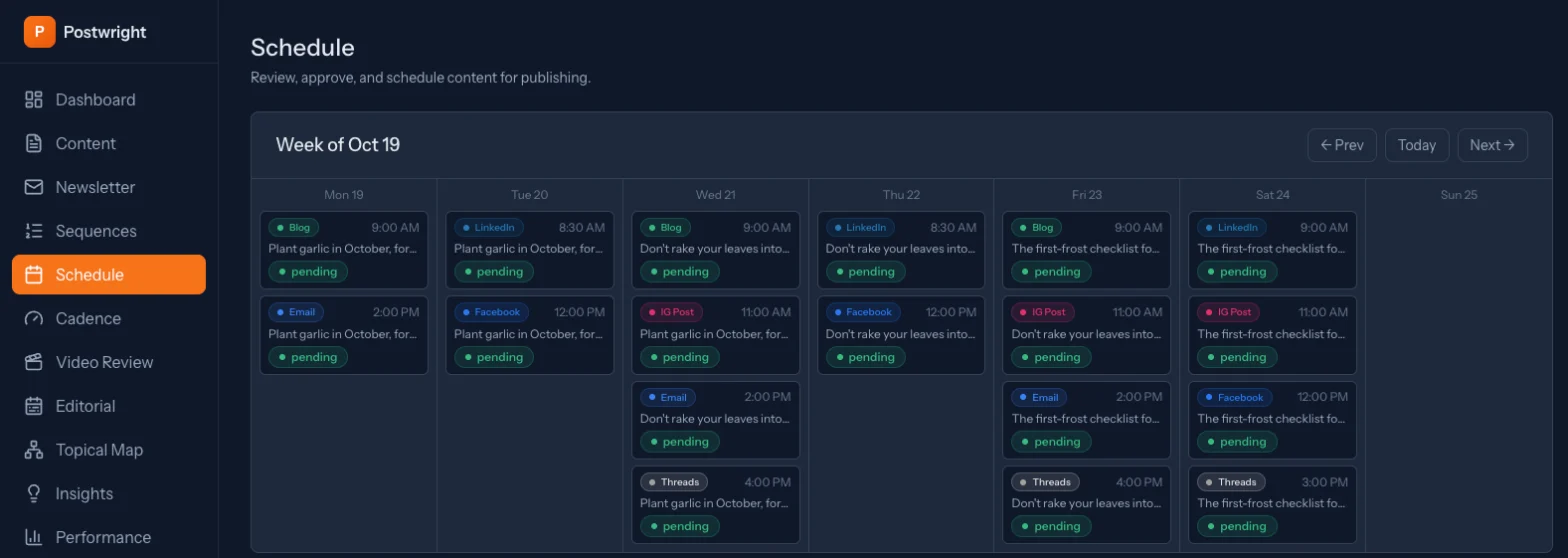
| Order between channels | I found no way to make a post wait for another channel’s live URL. RSS feeds and the WordPress plugin react after a post is published elsewhere. | Blog first, then the newsletter once the post’s URL answers, then social posts carrying that link |
| Teams | Unlimited members, approvals, and permissions on the Team plan | Pro is one operator. Team lets up to 25 people each run their own install. |
Where Buffer is stronger
Buffer’s free plan covers three channels with no card, and a paid channel starts at $5 or $6 a month, so if you only need a couple of social accounts scheduled it costs very little. It has iOS and Android apps (the Android one is rated 4.5 from 57.7K reviews) and browser extensions, and because it runs on Buffer’s servers, your posts go out with your computer off.
It also covers networks Postwright doesn’t – TikTok, Pinterest, X, Bluesky, Mastodon, Google Business – and the Team plan adds approval workflows, permissions, a comment inbox across networks, and reporting. Buffer has been doing this since 2010 and publishes its numbers openly: 293,707 monthly active users in its most recent open metrics.
Where Postwright is different
Buffer schedules social posts. Postwright publishes the things those posts point at, which is the job it did for Step Zero, my own newsletter, for a good while before anyone could buy it. The blog post gets committed to your repo and pushed, and Postwright polls the live URL until the page answers. The newsletter waits for that URL – Postwright checks it before sending – and then the LinkedIn, Facebook, Instagram, and Threads posts go out with the real link, each one written for its platform. With Buffer, the blog and the newsletter happen in other tools, and you keep the order in your head.
Postwright’s best-time slots come from your own channels’ engagement, rebuilt every week, where Buffer’s recommended times come from general platform data. And the video engine cuts the clips themselves – from a long recording, or a short you shot on your phone – instead of scheduling clips you made somewhere else.
Postwright runs on your Mac, so your Mac has to be awake for posts to go out on time. If it’s asleep, anything that came due goes out when it wakes, still in order.
What it costs over a year
The five networks Postwright posts to (YouTube, LinkedIn, Facebook, Instagram, Threads) would be five Buffer channels: $30 a month on Essentials billed monthly, $360 a year, or $300 billed yearly – for social scheduling only. Postwright Pro is $199 once and includes the blog and newsletter, and you pay your AI provider directly for the drafting it does. If three channels and ten queued posts each are enough, Buffer’s free plan is hard to beat.
Which one fits
Choose Buffer if
- You want to schedule from your phone, or from any browser
- You post to TikTok, Pinterest, X, Bluesky, or Google Business
- You only need a few channels and want a free or low monthly plan
- A team needs approvals and a shared comment inbox
Choose Postwright if
- You publish a blog and a newsletter, and want social to follow from them
- You want the newsletter and social posts to wait for the blog post’s real URL
- You’d rather pay once than pay per channel every month
- You want video clipped from your own files, on your own machine
Questions
Is Postwright a Buffer alternative?
For a solo publisher on a Mac whose week starts with a blog post and a newsletter, yes. For social-only scheduling across many networks or from a phone, Buffer covers more.
Does Buffer publish blog posts or newsletters?
No. Buffer’s WordPress plugin sends new blog posts into your social queue after they’re published, and its Substack support covers Notes, not newsletter issues.
Does Postwright post to TikTok, X, or Pinterest?
No. Postwright posts to YouTube, LinkedIn, Facebook Pages, Instagram, and Threads.
The video engine is free with the Step Zero newsletter. Pro adds the blog, the newsletter, social, and the ordering that ties them together, for $199 once, with a 14-day refund.